
Finance & Cash Flow
Invoicing and Payments
One tap turns the finished job into an invoice, and your crew collects with Tap to Pay on their phone, cash, check, or a text-to-pay link on the spot.
View feature
Keep company details, clients, invoices, and expenses aligned with QuickBooks Online.
When your team finishes the work, the office should not have to rebuild the same invoice, client, or expense record in a second system. QuickBooks sync keeps operations and accounting closer together from the start.
If these pains feel familiar, this feature is designed to remove them from the daily routine.
The office re-enters invoices and customer changes after work is already done.
QuickBooks setup feels like a migration project instead of a switch you can actually finish.
Team members are never fully sure which system has the latest truth.
Manual sync work slows down billing and creates avoidable mistakes.
From the first action to the finished outcome, this is the flow the team follows inside FieldCommerce.
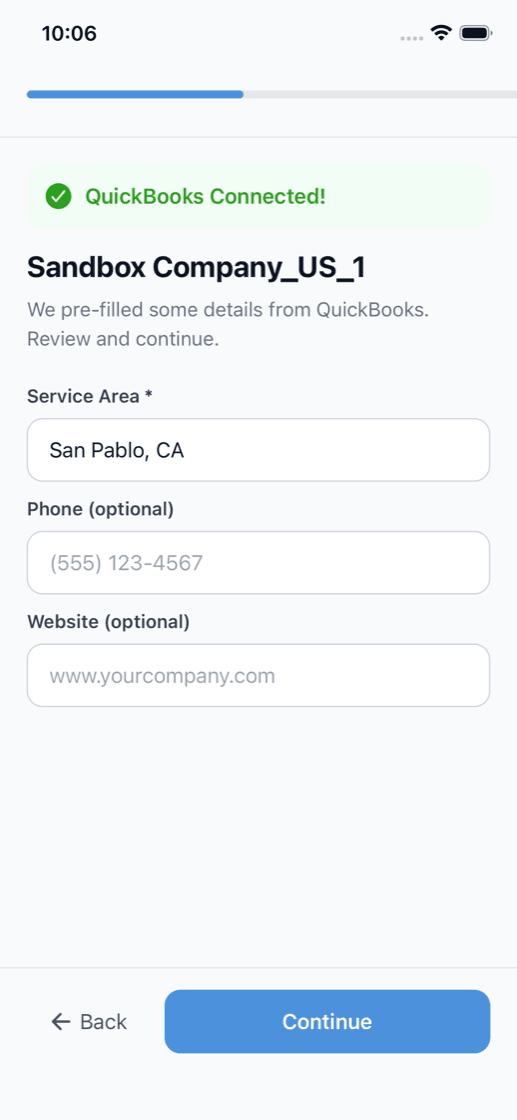
Link your QuickBooks account during setup so business and accounting data can move in a cleaner workflow.
Quotes, jobs, invoices, and expenses stay tied to the operational flow instead of being rebuilt later.
Accounting data stays easier to reconcile because the team is not juggling disconnected records.
The biggest gains usually come from removing scattered manual steps, duplicate entry, and routine follow-up work.
Rebuilding invoices in QuickBooks after jobs close
Copying customer changes between systems
Cleaning up accounting mistakes caused by duplicate entry

Owners, office staff, and field teams each get something different from the same workflow.
Get cleaner financial visibility without spending nights reconciling two disconnected systems.
Reduce re-entry work and make invoicing, expenses, and customer updates easier to trust.
Spend less time correcting avoidable sync issues and more time working from cleaner records.
Straight answers on where this capability fits into the day-to-day workflow.
Invoices, customers, and expenses stay aligned between FieldCommerce and QuickBooks Online, so the office is not maintaining the same records in two places by hand.
No. FieldCommerce runs the operational side (quotes, jobs, invoices, and payments) and QuickBooks stays your accounting system, with the two kept in sync.
Because duplicate entry gets worse as the business grows. A cleaner sync reduces billing delays, back-office mistakes, and end-of-day reconciliation work.
These features usually matter next because they solve the connected admin and operations work around the same job.
One tap turns the finished job into an invoice, and your crew collects with Tap to Pay on their phone, cash, check, or a text-to-pay link on the spot.
Organize recurring work, contract cadence, and billing with a cleaner system than ad hoc reminders.
Give customers one place for quotes, invoices, appointments, requests, and account history.
See how the same workflow applies to the trades where it matters most.
Bring scheduling, customer communication, invoicing, and back-office work into one system that is easier for the whole team to run.