
Finance & Cash Flow
Invoicing and Payments
One tap turns the finished job into an invoice, and your crew collects with Tap to Pay on their phone, cash, check, or a text-to-pay link on the spot.
View feature
Customers ask AI assistants to find and book local service pros. FieldCommerce puts your business in front of them and turns their request into a booked job on your calendar.
More people ask an AI assistant to find them a pest control company, a lawn crew, or a pool tech instead of searching and calling around. FieldCommerce lists the services and areas you choose, offers only the days you actually have room, and books the job straight onto your calendar with the customer's deposit already paid. No phone tag, no lead fees, no forms to chase.
If these pains feel familiar, this feature is designed to remove them from the daily routine.
Customers who reach out after hours go to whoever answers first.
Lead services charge you for inquiries that never turn into jobs.
Phone tag eats the day: calling back, checking the calendar, confirming the address.
People book, then do not show up, and you lose the slot.
From the first action to the finished outcome, this is the flow the team follows inside FieldCommerce.
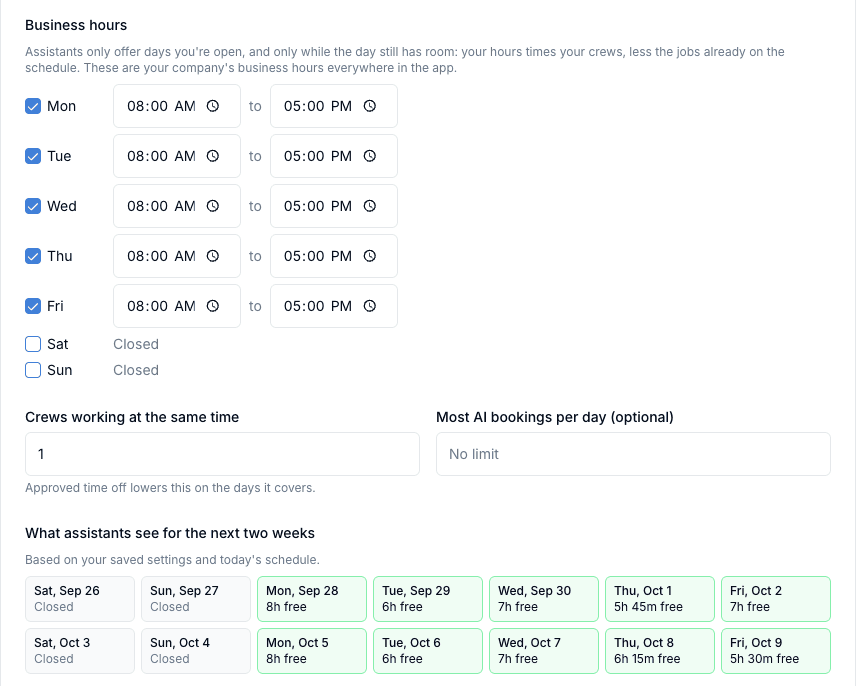
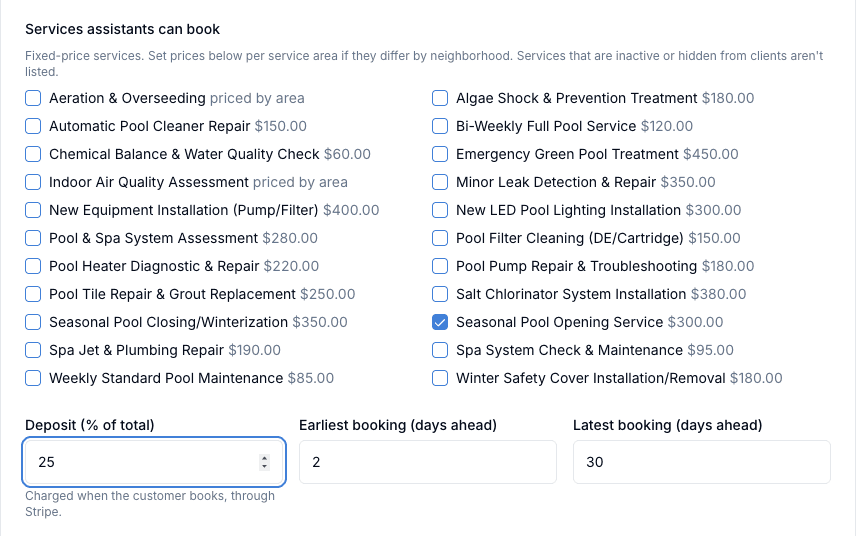
Pick the fixed-price services you want booked, the areas you serve, and your price in each area. Set your hours, how many crews you run, and how far ahead you take work.
The assistant sees your services, prices, and cancellation policy, and offers only the days your schedule still has room. The customer picks a day and pays your deposit.
The booking arrives as a job with the customer's name, address, service, and day, and a new client record. You assign the crew like any other job.
The biggest gains usually come from removing scattered manual steps, duplicate entry, and routine follow-up work.
Returning missed calls to people who already booked someone else
Paying for leads that never answer
Checking the calendar by hand before promising a day
Owners, office staff, and field teams each get something different from the same workflow.
New paying customers find you around the clock, and every booking arrives with the deposit already collected.
No callbacks or double entry: the booking is already a job with a client record, ready to dispatch.
Booked jobs show up on the schedule like any other work, with the address and service already filled in.
Straight answers on where this capability fits into the day-to-day workflow.
When someone asks an AI assistant to book a service in your area, the assistant can see the businesses on FieldCommerce that offer it there, including your services, prices, and open days. You choose exactly which services and areas are listed.
No. Assistants only see days you are open and that still have room, based on your hours, your number of crews, approved time off, and the jobs already on your schedule. You can also cap AI bookings per day.
With FieldCommerce Payments, you set a deposit percentage and the customer pays it when they book, straight to your account. If you use your own payment processor instead, bookings come in without a deposit and the customer pays you directly.
No. Keep it and assign a tech like any other job, suggest a different day or time for the customer to accept or decline, or cancel it. A cancelled booking refunds the deposit in full and the customer is notified. Customers can also cancel online for a full refund until the day before.
No. AI booking is included on every plan, with no lead fees.
These features usually matter next because they solve the connected admin and operations work around the same job.
One tap turns the finished job into an invoice, and your crew collects with Tap to Pay on their phone, cash, check, or a text-to-pay link on the spot.
Plan the day on a clear calendar, move jobs quickly, and keep routing more organized.
Capture service requests in a more organized format and turn intake into action with less manual cleanup.
See how the same workflow applies to the trades where it matters most.
Bring scheduling, customer communication, invoicing, and back-office work into one system that is easier for the whole team to run.